Flight Price Tracker
A Python CLI tool that automatically monitors flight prices on a specified route using the Google Flights API. It logs price history daily via a cron job, visualizes trends through an ASCII chart, and was built with security best practices, proper version control, and full documentation. Hands-on practice with API integration, data logging, and automation.
01 The situation
I fly between Providence and Raleigh-Durham fairly regularly and found myself constantly checking Google Flights manually or waiting for the price alert emails to land in my inbox - a process that seemed too passive and not proactive enough for someone who wanted to keep a close eye on the prices.
02 The task
I wanted to automate that process - build something that would track prices for me and surface trends over time - and use it as a hands-on way to build my Python skills.
03 The action
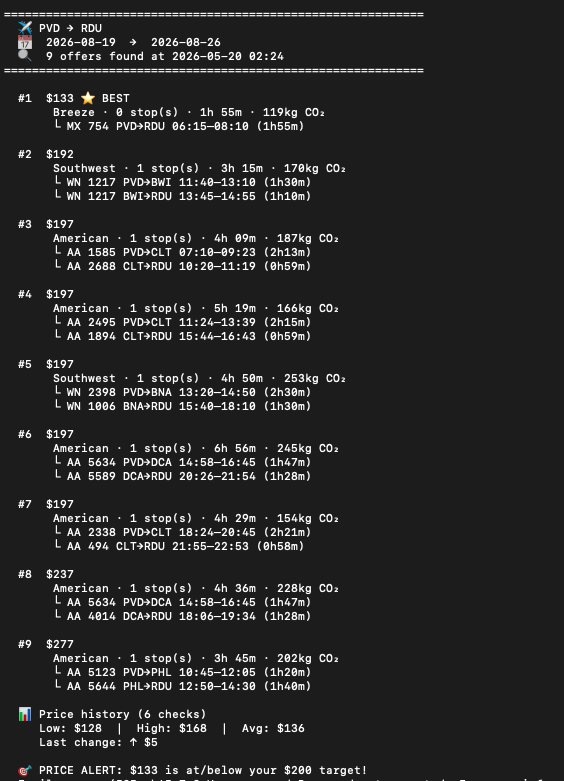
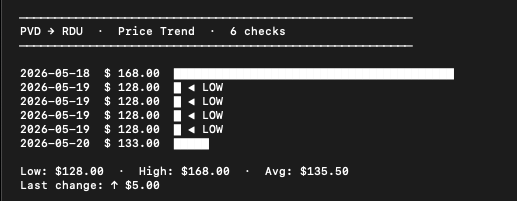
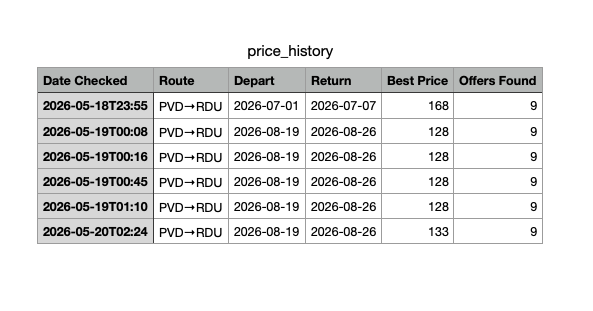
I built a Python CLI tool that connects to Google Flights via the SerpApi, pulls live flight data daily, and logs the results to a local file. It displays the results in Terminal with airline, duration, stops, and CO₂ data, and renders an ASCII chart so I can visualize how prices trend over time. It also generates a .csv file and opens it using the default app with a single bash command.
I set it up to run automatically every day at 6 PM using a cron job, so it requires zero manual effort.
I was also deliberate about security: I used a .env file to store my API key locally and configured .gitignore to ensure it never got pushed to the public GitHub repo. I then published the project with full documentation as a portfolio piece.
04 The result
I now have a running price history I can actually reference when booking — and more importantly, I got practical experience with API integration, data logging, automation, security best practices, and project documentation, all skills directly relevant to AI data ops work.